 朔风
朔风DSL 搜索高亮显示案例
日常搜索产品的时候,会有关键词显示不一样的颜色,方便用户直观看到区别
Elastic Search 搜索引擎如何做到高亮显示
- 在 ES 中,高亮语法用于在搜索结果中突出显示与查询匹配的关键词
- 高亮显示是通过标签包裹匹配的文本来实现的,通常是
<em>或其他HTML标签 - 基本用法:在 highlight 里面填写要高亮显示的字段,可以填写多个
数据准备
创建索引库
shell
PUT /shuofeng_high_light_test
{
  "mappings": {
    "properties": {
      "title": {
          "type": "text",
          "analyzer": "ik_max_word"
        },
        "content": {
          "type": "text",
          "analyzer": "ik_max_word"
        }
     }
  },
  "settings": {
    "number_of_shards": 2,
    "number_of_replicas": 0
  }
}
插入数据
shell
#插入数据
PUT /shuofeng_high_light_test/_doc/1
{
  "title": "飞驰人生3是 2026 年新年档年最新好看的电影推荐",
  "content": "每年都有新电影上线,2026年最新好看的电影有不少,电影院上线了《飞驰人生3》,《惊蛰无声》精彩电影"
}


PUT /shuofeng_high_light_test/_doc/2
{
  "title": "写下你认为好看的电影有哪些",
  "content": "每个人都看看很多电影,说下你近10年看过比较好的电影,比如《飞驰人生3》,《惊蛰无声》,《西虹市首富》"
}
案例
单条件查询高亮显示
shell
GET /shuofeng_high_light_test/_search
{
  "query": {
    "match": {
      "content": "电影"
    }
  },
  "highlight": {
    "fields": {
      "content": {}
    }
  }
}
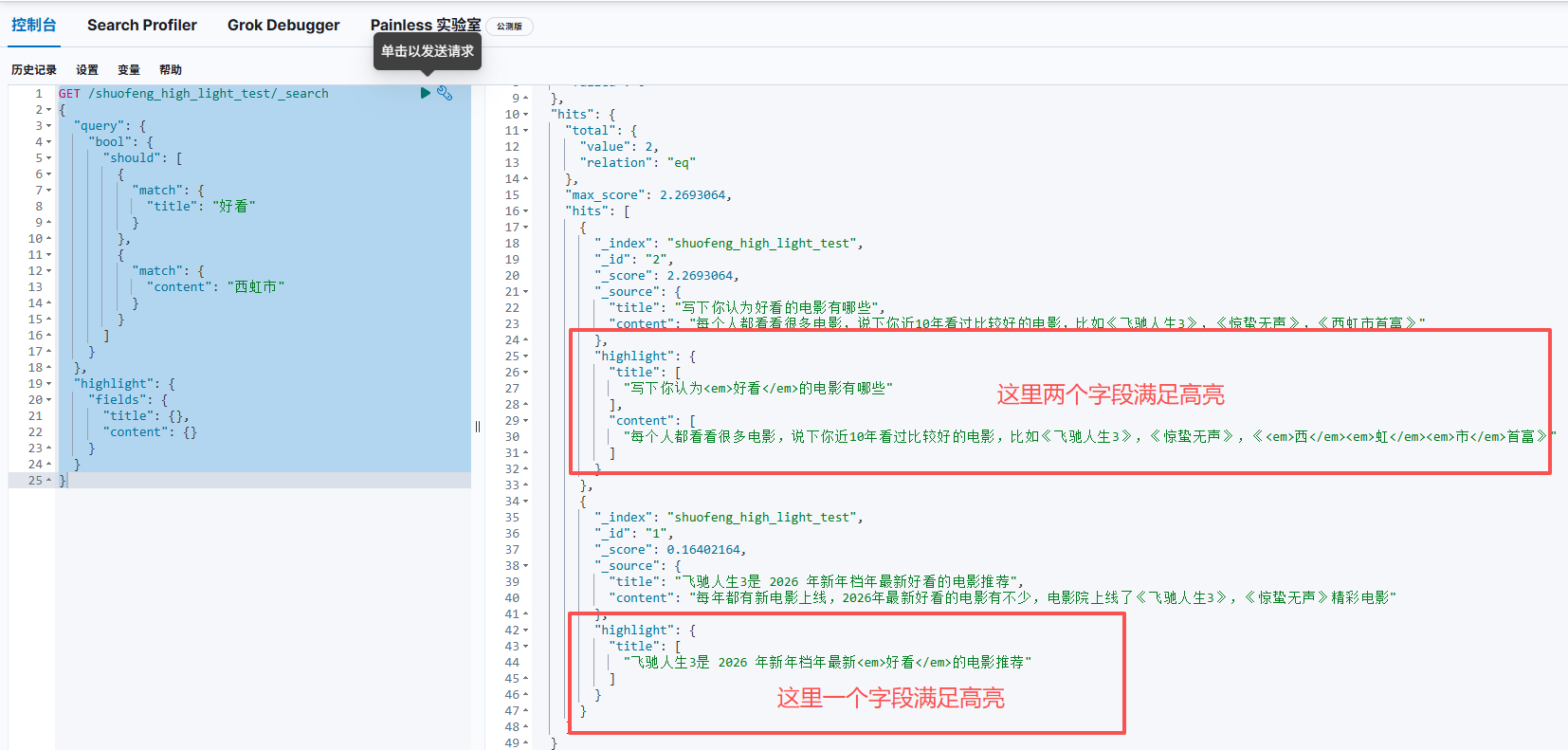
组合多条件查询
highlight 里面填写需要高亮的字段
shell
GET /shuofeng_high_light_test/_search
{
  "query": {
    "bool": {
      "should": [
        {
          "match": {
            "title": "好看"
          }
        },
        {
          "match": {
            "content": "西虹市"
          }
        }
      ]
    }
  },
  "highlight": {
    "fields": {
      "title": {},
      "content": {}
    }
  }
}
match 查询
使用 highlight 属性,可以增加属性,修改高亮样式
- pre_tags: 前置标签
- post_tags: 后置标签
- fields: 需要高亮的字段
shell
GET /shuofeng_high_light_test/_search
{
  "query": {
    "bool": {
      "should": [
        {
          "match": {
            "title": "好看"
          }
        },
        {
          "match": {
            "content": "西虹市"
          }
        }
      ]
    }
  },
  "highlight": {
    "pre_tags": "<font color='yellow'>",
    "post_tags": "</font>",
    "fields": [{"title":{}},{"content":{}}]
  }
}