 朔风
朔风ElasticSearch 8.x 的聚合查询介绍和应用案例
什么是聚合查询
- 对大量数据聚合统计处理,类似 Mysql 数据库操作里面的 group by、sum、avg、max 等函数处理
- 是 Elasticsearch 中强大的功能之一,根据数据进行分组、过滤、计算和统计,提取有关数据集信息,进行数据分析
- 数据可视化大屏里面的饼状图、柱状图、折线图、仪表盘数据等都是聚合查询的关键应用
术语
术语一
对数据集求最大、最小、和、平均值等指标的聚合,称为 指标聚合 metric
基本语法格式如下
shell
GET /index/_search
{
  "size": 0,
  "aggs": {
    "aggregation_name": {
      "aggregation_type": {
        "aggregation_field": "field_name"
        // 可选参数
      }
    }
    // 可以添加更多的聚合
  }
}

# 解析
# index:要执行聚合查询的索引名称。
# size: 设置为 0 来仅返回聚合结果,而不返回实际的搜索结果,这里将hits改为0表示返回的原始数据变为0
# aggs:指定聚合操作的容器。

# aggregation_name:聚合名称,可以自定义。
# aggregation_type:聚合操作的类型,例如 terms、avg、sum 等。
# aggregation_field:聚合操作的目标字段,对哪些字段进行聚合
术语二
对数据集进行分组 group by,然后在组上进行指标聚合,在 ES 中称为分桶,桶聚合 bucketing
shell
GET /index/_search
{
  "size": 0,
  "aggs": {
    "aggregation_name": {
      "bucket_type": {
        "bucket_options": {
          "bucket_option_name": "bucket_option_value",
          ...
        },
        "aggs": {
          "sub_aggregation_name": {
            "sub_aggregation_type": {
              "sub_aggregation_options": {
                "sub_aggregation_option_name": "sub_aggregation_option_value",
                ...
              }
            }
          }
        }
      }
    }
  }
}
# 解析
# index: 替换为要执行聚合查询的索引名称。
# aggregation_name: 替换为自定义的聚合名称。
# bucket_type: 替换为特定的桶聚合类型(如 terms、date_histogram、range 等)。
# bucket_option_name 和 bucket_option_value: 替换为特定桶聚合选项的名称和值。

# sub_aggregation_name: 替换为子聚合的名称。
# sub_aggregation_type: 替换为特定的子聚合类型(如 sum、avg、max、min 等)。
# sub_aggregation_option_name 和 sub_aggregation_option_value: 替换为特定子聚合选项的名称和值
名词
聚合指标(Aggregation Metrics)
| 名词 | 描述 |
|---|---|
| Avg Aggregation | 计算文档字段的平均值。 |
| Sum Aggregation | 计算文档字段的总和。 |
| Min Aggregation | 找到文档字段的最小值。 |
| Max Aggregation | 找到文档字段的最大值。 |
聚合桶(Aggregation Buckets)
| 名词 | 描述 |
|---|---|
| Terms Aggregation | 基于字段值将文档分组到不同的桶中。 |
| Date Histogram Aggregation | 按日期/时间字段创建时间间隔的桶。 |
| Range Aggregation | 根据字段值的范围创建桶。 |
嵌套聚合(Nested Aggregations)、聚合过滤(Aggregation Filtering)。。。
数据环境准备
创建索引
shell
PUT /sales
{
  "mappings": {
    "properties": {
      "product": {
        "type": "keyword"
      },
      "sales": {
        "type": "integer"
      }
    }
  }
}
批量插入数据
shell
POST /sales/_bulk
{"index": {}}
{"product": "iPhone", "sales": 4}
{"index": {}}
{"product": "Samsung", "sales": 60}
{"index": {}}
{"product": "iPhone", "sales": 100}
{"index": {}}
{"product": "Samsung", "sales": 80}
{"index": {}}
{"product": "小辣椒手机", "sales": 50}
{"index": {}}
{"product": "小辣椒手机", "sales": 5000}
{"index": {}}
{"product": "小辣椒手机", "sales": 200}
案例
执行聚合查询
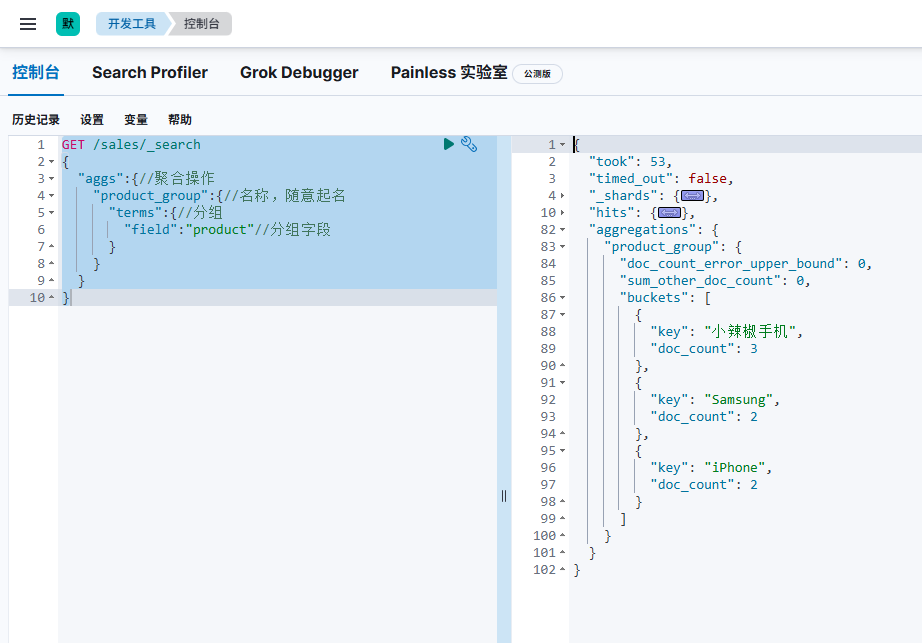
分别按照商品名称(product)进行分组
shell
GET /sales/_search
{
  "aggs":{//聚合操作
    "product_group":{//名称,随意起名
      "terms":{//分组
        "field":"product"//分组字段
      }
    }
  }
}
计算每组的销售总量
使用 terms 聚合和 sum 聚合来实现,查询结果将返回每个产品的名称和销售总量
shell
GET /sales/_search
{
  "size": 0,
  "aggs": {
    "product_sales": {
      "terms": {
        "field": "product"
      },
      "aggs": {
        "total_sales": {
          "sum": {
            "field": "sales"
          }
        }
      }
    }
  }
}