 朔风
朔风SpringBoot 集成 Thymeleaf
Thymeleaf 官网
集成 Thymeleaf
pom.xml 中添加依赖
xml
<dependencies>

        ......

        <dependency>
            <groupId>org.springframework.boot</groupId>
            <artifactId>spring-boot-starter-thymeleaf</artifactId>
        </dependency>

    </dependencies>
添加配置
在 resources/application.yml 文件中添加 thymeleaf 配置
spring:

   ......

   thymeleaf:
        mode: HTML5
        cache: false
        encoding: utf-8
完整 application.yml 配置文件如下:
server:
  port: 8080

fly:
  version: 1.0

spring:
  application:
    name: spring-boot-demo
  thymeleaf:
    mode: HTML5
    cache: false
    encoding: utf-8
创建视图文件
在 resources 下添加 templates 文件夹, 创建 index.html 文件
html
<!DOCTYPE html>
<html lang="en">
<head>
    <meta charset="UTF-8">
    <title>Hello Thymeleaf</title>
</head>
<body>


<h1 style="color: red">Hello Thymeleaf</h1>

</body>
</html
在 hello 文件夹下创建 HelloTemplateController 类
@Controller
@RequestMapping("/hello")
public class HelloTemplateController {

    @GetMapping("/template")
    public String helloTemplate() {
        return "index";
    }

}
测试
启动项目, 通过浏览器访问 http://127.0.0.1:8080/hello/template, 页面出现红色的 Hello Thymeleaf
本章节项目目录
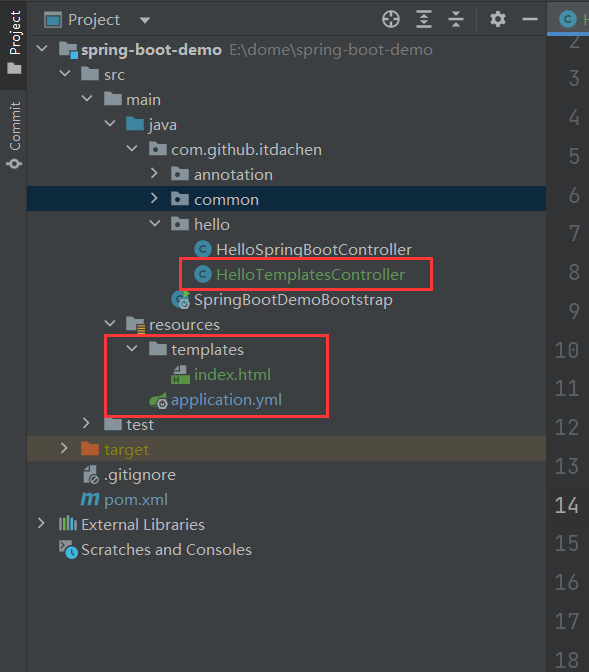
回显案例
下拉回显
html
<select id="type" name="type" lay-filter="libraryType"
th:with="type=${@dict.getType('library_type')}">
  <option th:each="dict : ${type}"
  th:selected="${dict.dictValue eq library.type}"
  th:text="${dict.dictLabel}"
  th:value="${dict.dictValue}"></option>
</select>
单选回显
html
<div class="radio-box" th:each="dict : ${@dict.getType('library_answer')}">
    <input type="radio" name="answer"
           th:value="${dict.dictLabel}" th:title="${dict.dictValue}"
           th:attr="checked=${dict.dictValue eq library.answer}">
</div>
多选回显
html
<div class="radio-box" th:each="dict : ${@dict.getType('library_answer')}">
    <input type="checkbox" name="answer" th:value="${dict.dictLabel}" th:title="${dict.dictValue}"
           th:attr="checked=${library.answer.contains(dict.dictLabel)?true:false}">
</div>
Thymeleaf 判断
判断是不是为空:null:
<span th:if="${name} != null">不为空</span><span th:if="${name1} == null">为空</span>
判断是不是为空字符串: “”
<span th:if="${#strings.isEmpty(name1)}">空的</span>
判断是否相同:
<span th:if="${name} eq 'jack'">相同于jack,</span><span th:if="${name} eq 'ywj'">相同于ywj,</span><span th:if="${name} ne 'jack'">不相同于jack,</span>
不存在设置默认值:
<span th:text="${name2} ?: '默认值'"></span>
是否包含(分大小写):
<span th:if="${#strings.contains(name,'ez')}">包ez</span><span th:if="${#strings.contains(name,'y')}">包j</span>
是否包含(不分大小写)
<span th:if="${#strings.containsIgnoreCase(name,'y')}">包j</span>
Thymeleaf 对字符串的操作
${#strings.startsWith(name,'o')}${#strings.endsWith(name, 'o')}${#strings.indexOf(name,frag)}// 下标${#strings.substring(name,3,5)}// 截取${#strings.substringAfter(name,prefix)}// 从 prefix之后的一位开始截取到最后,比如 (ywj,y) = wj, 如果是(abccdefg,c) = cdefg//里面有2个c,取的是第一个c${#strings.substringBefore(name,suffix)}// 同上,不过是往前截取${#strings.replace(name,'las','ler')}// 替换${#strings.prepend(str,prefix)}// 拼字字符串在str前面${#strings.append(str,suffix)}// 和上面相反,接在后面${#strings.toUpperCase(name)}${#strings.toLowerCase(name)}${#strings.trim(str)}${#strings.length(str)}${#strings.abbreviate(str,10)}// str截取0-10位,后面的全部用…这个点代替,注意,最小是3位
Thymeleaf 常用标签属性
| 标签 | 说明 | 示例 |
|---|---|---|
| th:id | 替换id | <input th:id="'xxx' + ${collect.id}"/> |
| th:text | 文本替换 | <p th:text="${collect.description}">description</p> |
| th:utext | 支持html的文本替换 | <p th:utext="${htmlcontent}">conten</p> |
| th:object | 替换对象 | <div th:object="${session.user}"> |
| th:value | 属性赋值 | <input th:value="${user.name}" /> |
| th:with | 变量赋值运算 | <div th:with="isEven=${prodStat.count}%2==0"></div> |
| th:style | 设置样式 | th:style="'display:' + @{(${sitrue} ? 'none' : 'inline-block')} + ''" |
| th:onclick | 点击事件 | th:οnclick="'getCollect()'" |
| th:each | 属性赋值 | <tr th:each="user,userStat:${users}" |
| th:if | 判断条件 | <a th:if="${userId == collect.userId}" > |
| th:unless | 和th:if判断相反 | <a th:href="@{/login}" th:unless=${session.user != null}>Login</a> |
| th:href | 链接地址 | <a th:href="@{/login}" th:unless=${session.user != null}>Login</a> /> |
| th:switch | 多路选择 配合th:case 使用 | <div th:switch="${user.role}"> |
| th:case | th:switch的一个分支 | <p th:case="'admin'">User is an administrator</p> |
| th:fragment | 布局标签,定义一个代码片段,方便其它地方引用 | <div th:fragment="alert"> |
| th:include | 布局标签,替换内容到引入的文件 | <head th:include="layout :: htmlhead" th:with="title='xx'"></head> /> |
| th:replace | 布局标签,替换整个标签到引入的文件 | <div th:replace="fragments/header :: title"></div> |
| th:selected | selected选择框 选中 | th:selected="(${xxx.id} == ${configObj.dd})" |
| th:src | 图片类地址引入 | <img class="img-responsive" alt="App Logo" th:src="@{/img/logo.png}" /> |
| th:inline | 定义js脚本可以使用变量 | <script type="text/javascript" th:inline="javascript"> |
| th:action | 表单提交的地址 | <form action="subscribe.html" th:action="@{/subscribe}"> |
| th:remove | 删除某个属性 | <tr th:remove="all"> 1.all:删除包含标签和所有的孩子。 2.body:不包含标记删除,但删除其所有的孩子。 3.tag:包含标记的删除,但不删除它的孩子。 4.all-but-first:删除所有包含标签的孩子,除了第一个。 5.none:什么也不做。这个值是有用的动态评估。 |
| th:attr | 设置标签属性,多个属性可以用逗号分隔 | 比如 th:attr="src=@{/image/aa.jpg},title=#{logo}",此标签不太优雅,一般用的比较少。 |
th:field、 th:value 的区别
- thymeleaf 里的 th:field 等同于 th:name 和 th:value,浏览器在解析 th:field 的时候,会解析成 value="${th:field}" name="${th:field}" 的值。
- 然后后台就可以接收到从前台传过来的值。而 th:value 可以接受到后台的的值,后台则可以根据 name 获取到前台的值。
- th:field 和 th:value 都有两种从后台接受值的方式: 1、${obj.name} 2、*{name}。
- 需要注意的是,th:field 需要有 th:object。
Thymeleaf 更多常用标签
https://blog.csdn.net/zhangyuliang6430/article/details/90230640