 朔风
朔风服务注册及发现
Nacos 添加命名空间
登录 Nacos, 命名空间, 命名空间为: 07656b3c-bb69-470a-a942-6ae27b5287cb(命名空间可以自己自定义, 配置文件中指定到命名空间即可) 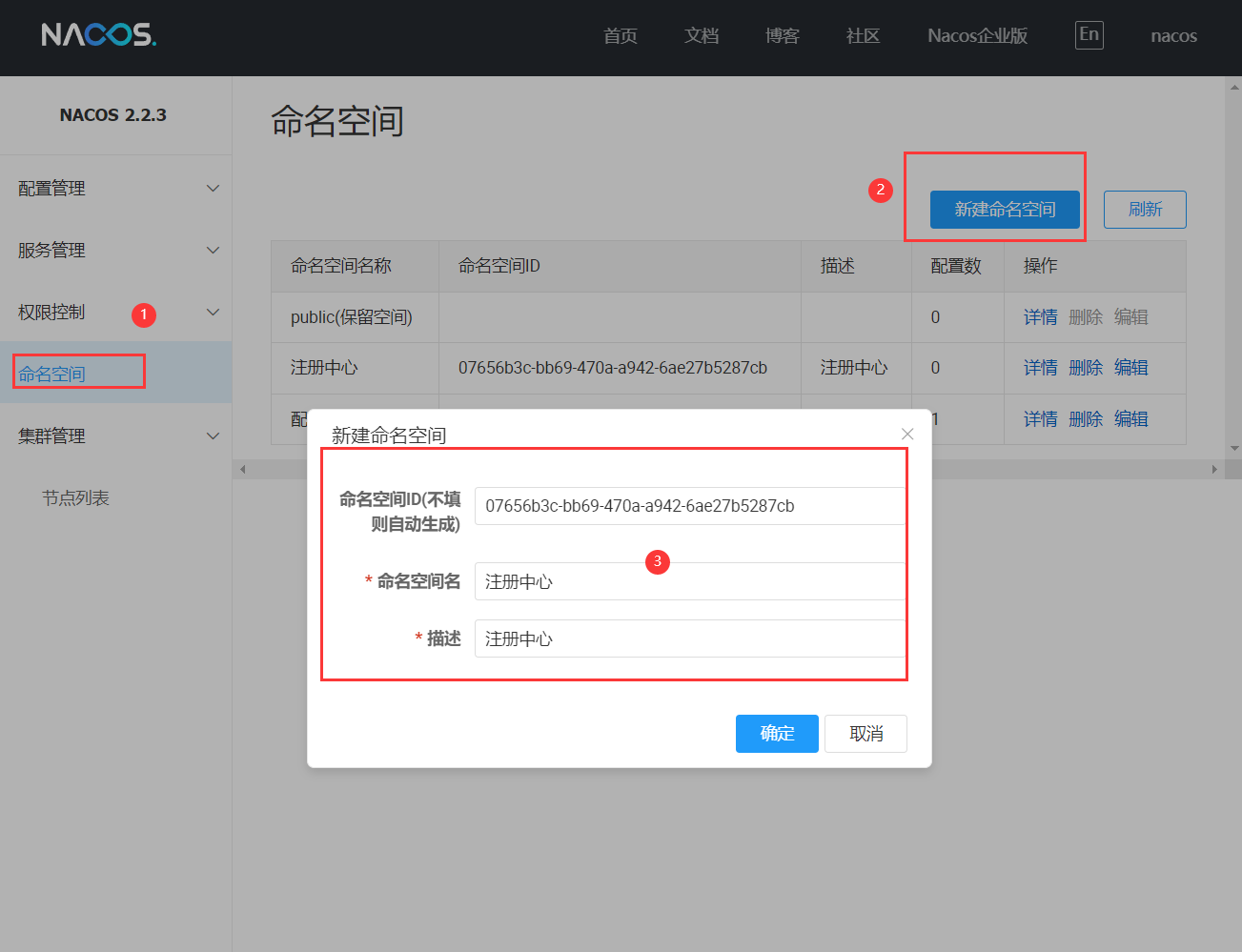
创建 Nacos 客户端
在 fly-cloud 下创建 Maven 模块 fly-nacos-client
pom 文件如下
xml
<?xml version="1.0" encoding="UTF-8"?>
<project xmlns="http://maven.apache.org/POM/4.0.0"
         xmlns:xsi="http://www.w3.org/2001/XMLSchema-instance"
         xsi:schemaLocation="http://maven.apache.org/POM/4.0.0 http://maven.apache.org/xsd/maven-4.0.0.xsd">
    <modelVersion>4.0.0</modelVersion>
    <parent>
        <groupId>com.github.itdachen</groupId>
        <artifactId>fly-cloud</artifactId>
        <version>0.0.1</version>
    </parent>

    <artifactId>fly-nacos-client</artifactId>
    <name>${project.artifactId}</name>
    <packaging>jar</packaging>
    <version>${fly.cloud.version}</version>
    <description>服务注册及发现</description>

    <dependencies>
        <!-- 启动日志模块 -->
        <dependency>
            <groupId>com.github.itdachen.framework</groupId>
            <artifactId>fly-runner</artifactId>
        </dependency>

        <!-- 項目启动容器 -->
        <dependency>
            <groupId>org.springframework.boot</groupId>
            <artifactId>spring-boot-starter-web</artifactId>
            <exclusions>
                <exclusion>
                    <groupId>org.springframework.boot</groupId>
                    <artifactId>spring-boot-starter-tomcat</artifactId>
                </exclusion>
            </exclusions>
        </dependency>
        <dependency>
            <groupId>org.springframework.boot</groupId>
            <artifactId>spring-boot-starter-undertow</artifactId>
        </dependency>

        <!-- nacos discovery -->
        <dependency>
            <groupId>com.alibaba.cloud</groupId>
            <artifactId>spring-cloud-starter-alibaba-nacos-discovery</artifactId>
        </dependency>

        <!-- 新版本的微服务默认不加载 bootstrap.yml 文件, 需要添加 bootstrap 依赖 -->
        <dependency>
            <groupId>org.springframework.cloud</groupId>
            <artifactId>spring-cloud-starter-bootstrap</artifactId>
        </dependency>

        <!-- 健康检查 -->
        <dependency>
            <groupId>org.springframework.boot</groupId>
            <artifactId>spring-boot-starter-actuator</artifactId>
        </dependency>

    </dependencies>

</project>
添加项目启动类
在 com.github.itdachen 包下面, 添加 NacosClientBootstrap 类
shell
@SpringBootApplication
@EnableDiscoveryClient
public class NacosClientBootstrap {

    public static void main(String[] args) {
        SpringBootBootstrap.run(NacosClientBootstrap.class);
    }

}
注解说明:
- @SpringBootApplication: SpringBoot项目注解
- @EnableDiscoveryClient: 微服务客户端注解
添加配置文件
在 resources 目录下, 添加 bootstrap.yml 文件
shell
# 端口配置
server:
  port: 8000
  servlet:
    context-path: /${spring.application.name}

spring:
  application:
    name: nacos-client
  main:
    allow-circular-references: true
    allow-bean-definition-overriding: true

  jackson:
    date-format: yyyy-MM-dd HH:mm:ss
    time-zone: GMT+8

  cloud:
    ## 向 nacos 发起注册
    nacos:
    ## Nacos 账号及密码
      username: nacos
      password: nacos
      discovery:
        enabled: true # 如果不想使用 Nacos 进行服务注册和发现, 设置为 false 即可
        server-addr: 127.0.0.1:8848 # Nacos 注册地址
        namespace.md: 07656b3c-bb69-470a-a942-6ae27b5287cb # 上一步注册的命名空间
        group: DEFAULT_GROUP # 注册分组
        metadata:
          management:
            context-path: ${server.servlet.context-path}/actuator

# 暴露端点
management:
  endpoints:
    web:
      exposure:
        include: '*'
  endpoint:
    health:
      show-details: ALWAYS
服务注册
启动项目, 进入 Nacos, 在 服务管理/服务列表 中查看注册的服务信息 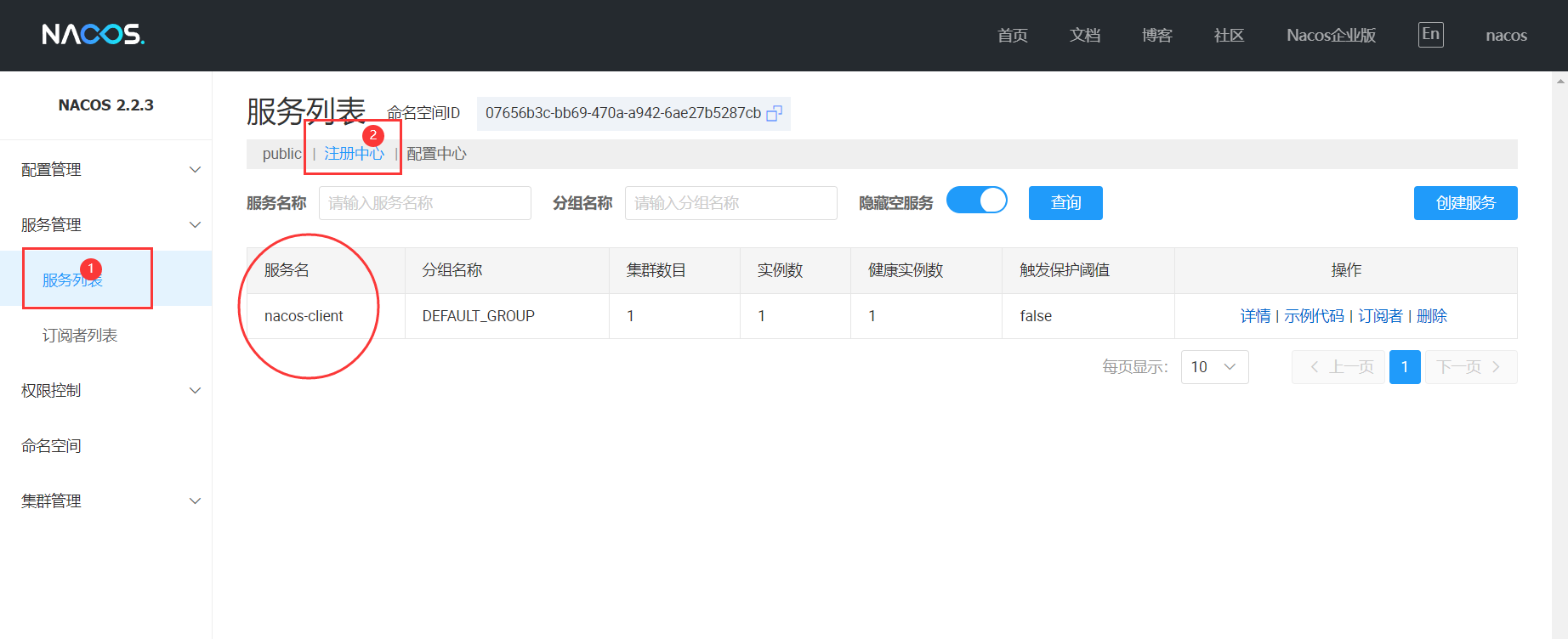
服务发现
编写 Controller 类
shell
@RestController
@RequestMapping("/nacos-client")
public class NacosClientController {
    private static final Logger logger = LoggerFactory.getLogger(NacosClientController.class);

    private final DiscoveryClient discoveryClient;

    public NacosClientController(DiscoveryClient discoveryClient) {
        this.discoveryClient = discoveryClient;
    }

    /***
     * 根据 service id 获取服务所有的实例信息
     *
     * @author 王大宸
     * @date 2023/8/5 21:08
     * @param serviceId serviceId
     * @return java.util.List<org.springframework.cloud.client.ServiceInstance>
     */
    @GetMapping("/service-instance")
    public List<ServiceInstance> nacosClientInfo(@RequestParam(defaultValue = "nacos-client") String serviceId) {
        logger.info("request nacos client to get service instance info: [{}]", serviceId);
        return discoveryClient.getInstances(serviceId);
    }

}
编写 nacos-client.http 文件
在 resources 目录下, 添加 nacos-client.http 文件
shell
### 查询服务实例信息
GET http://127.0.0.1:8000/nacos-client/nacos-client/service-instance
Accept: application/json
重启项目, 运行 GET 请求, 返回数据如下:
json
[
  {
    "serviceId": "nacos-client",
    "instanceId": null,
    "host": "192.168.232.1",
    "port": 8000,
    "secure": false,
    "metadata": {
      "nacos.instanceId": null,
      "nacos.weight": "1.0",
      "nacos.cluster": "DEFAULT",
      "nacos.ephemeral": "true",
      "nacos.healthy": "true",
      "preserved.register.source": "SPRING_CLOUD",
      "management.context-path": "/nacos-client/actuator"
    },
    "uri": "http://192.168.232.1:8000",
    "scheme": null
  }
]
查看指定服务的注册信息
创建网关模块
在 fly-cloud 下创建 Maven 模块 fly-gateway
pom 文件如下
xml
<?xml version="1.0" encoding="UTF-8"?>
<project xmlns="http://maven.apache.org/POM/4.0.0"
         xmlns:xsi="http://www.w3.org/2001/XMLSchema-instance"
         xsi:schemaLocation="http://maven.apache.org/POM/4.0.0 http://maven.apache.org/xsd/maven-4.0.0.xsd">
    <modelVersion>4.0.0</modelVersion>
    <parent>
        <groupId>com.github.itdachen</groupId>
        <artifactId>fly-cloud</artifactId>
        <version>0.0.1</version>
    </parent>

    <artifactId>fly-gateway</artifactId>
    <name>${project.artifactId}</name>
    <packaging>jar</packaging>
    <version>${fly.cloud.version}</version>
    <description>网关</description>

    <dependencies>
        <!-- 启动日志模块 -->
        <dependency>
            <groupId>com.github.itdachen.framework</groupId>
            <artifactId>fly-runner</artifactId>
        </dependency>

        <!-- 項目启动容器 -->
        <dependency>
            <groupId>org.springframework.boot</groupId>
            <artifactId>spring-boot-starter-web</artifactId>
            <exclusions>
                <exclusion>
                    <groupId>org.springframework.boot</groupId>
                    <artifactId>spring-boot-starter-tomcat</artifactId>
                </exclusion>
            </exclusions>
        </dependency>
        <dependency>
            <groupId>org.springframework.boot</groupId>
            <artifactId>spring-boot-starter-undertow</artifactId>
        </dependency>

        <!-- nacos discovery -->
        <dependency>
            <groupId>com.alibaba.cloud</groupId>
            <artifactId>spring-cloud-starter-alibaba-nacos-discovery</artifactId>
        </dependency>

        <!-- 新版本的微服务默认不加载 bootstrap.yml 文件, 需要添加 bootstrap 依赖 -->
        <dependency>
            <groupId>org.springframework.cloud</groupId>
            <artifactId>spring-cloud-starter-bootstrap</artifactId>
        </dependency>

        <!-- 健康检查 -->
        <dependency>
            <groupId>org.springframework.boot</groupId>
            <artifactId>spring-boot-starter-actuator</artifactId>
        </dependency>

    </dependencies>

</project>
添加项目启动类
在 com.github.itdachen 包下面, 添加 GatewayBootstrap 类
shell
@SpringBootApplication
@EnableDiscoveryClient
public class GatewayBootstrap {

    public static void main(String[] args) {
        SpringBootBootstrap.run(GatewayBootstrap.class);
    }

}
添加配置文件
在 resources 目录下, 添加 bootstrap.yml 文件
shell
# 端口配置
server:
  port: 8001
  servlet:
    context-path: /${spring.application.name}

spring:
  application:
    name: gateway
  main:
    allow-circular-references: true
    allow-bean-definition-overriding: true

  jackson:
    date-format: yyyy-MM-dd HH:mm:ss
    time-zone: GMT+8

  cloud:
    ## 向 nacos 发起注册
    nacos:
    ## Nacos 账号及密码
      username: nacos
      password: nacos
      discovery:
        enabled: true # 如果不想使用 Nacos 进行服务注册和发现, 设置为 false 即可
        server-addr: 127.0.0.1:8848 # Nacos 注册地址
        namespace.md: 07656b3c-bb69-470a-a942-6ae27b5287cb # 上一步注册的命名空间
        group: DEFAULT_GROUP # 注册分组
        metadata:
          management:
            context-path: ${server.servlet.context-path}/actuator

# 暴露端点
management:
  endpoints:
    web:
      exposure:
        include: '*'
  endpoint:
    health:
      show-details: ALWAYS
nacos-client.http 添加 GET 请求
shell
### 查询服务实例信息, 指定获取实例名称
GET http://127.0.0.1:8000/nacos-client/nacos-client/service-instance?serviceId=gateway
Accept: application/json
完整 nacos-client.http 如下
shell
### 查询服务实例信息
GET http://127.0.0.1:8000/nacos-client/nacos-client/service-instance
Accept: application/json


### 查询服务实例信息, 指定获取实例名称
GET http://127.0.0.1:8000/nacos-client/nacos-client/service-instance?serviceId=gateway
Accept: application/json
启动网关服务, 查看 Nacos 服务列表 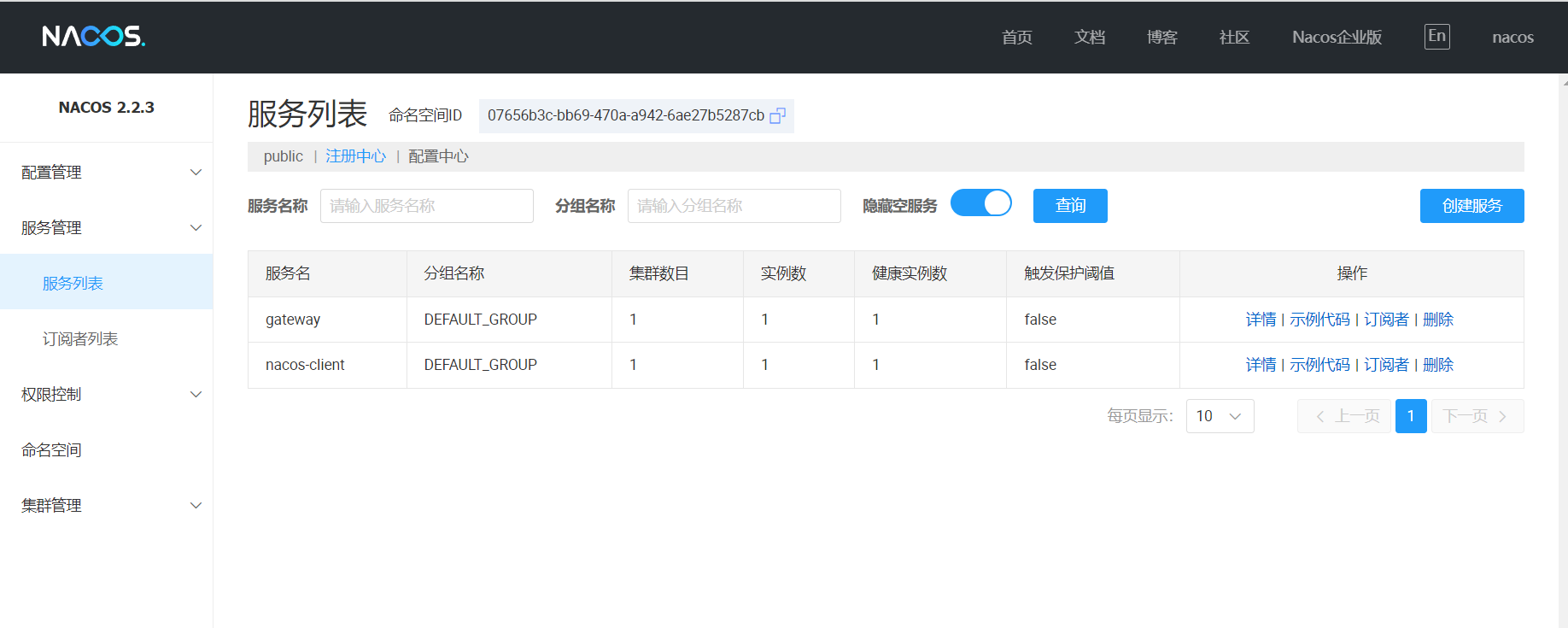
运行第二个 GET 请求, 查询网关注册实例信息, 返回数据如下:
json
[
  {
    "serviceId": "gateway",
    "instanceId": null,
    "host": "192.168.232.1",
    "port": 8080,
    "secure": false,
    "metadata": {
      "preserved.heart.beat.timeout": "3000",
      "preserved.ip.delete": "",
      "nacos.instanceId": null,
      "nacos.weight": "1.0",
      "nacos.cluster": "DEFAULT",
      "nacos.ephemeral": "true",
      "nacos.healthy": "true",
      "preserved.register.source": "SPRING_CLOUD",
      "management.context-path": "/actuator",
      "preserved.heart.beat.interval": "3000"
    },
    "uri": "http://192.168.232.1:8080",
    "scheme": null
  }
]